Publishing & Deployment
When your replica is ready, publishing turns it into a live production site. Publishing snapshots a production build, deploys it, and wires in analytics — all with status tracking and a one-click escape hatch if something goes wrong.
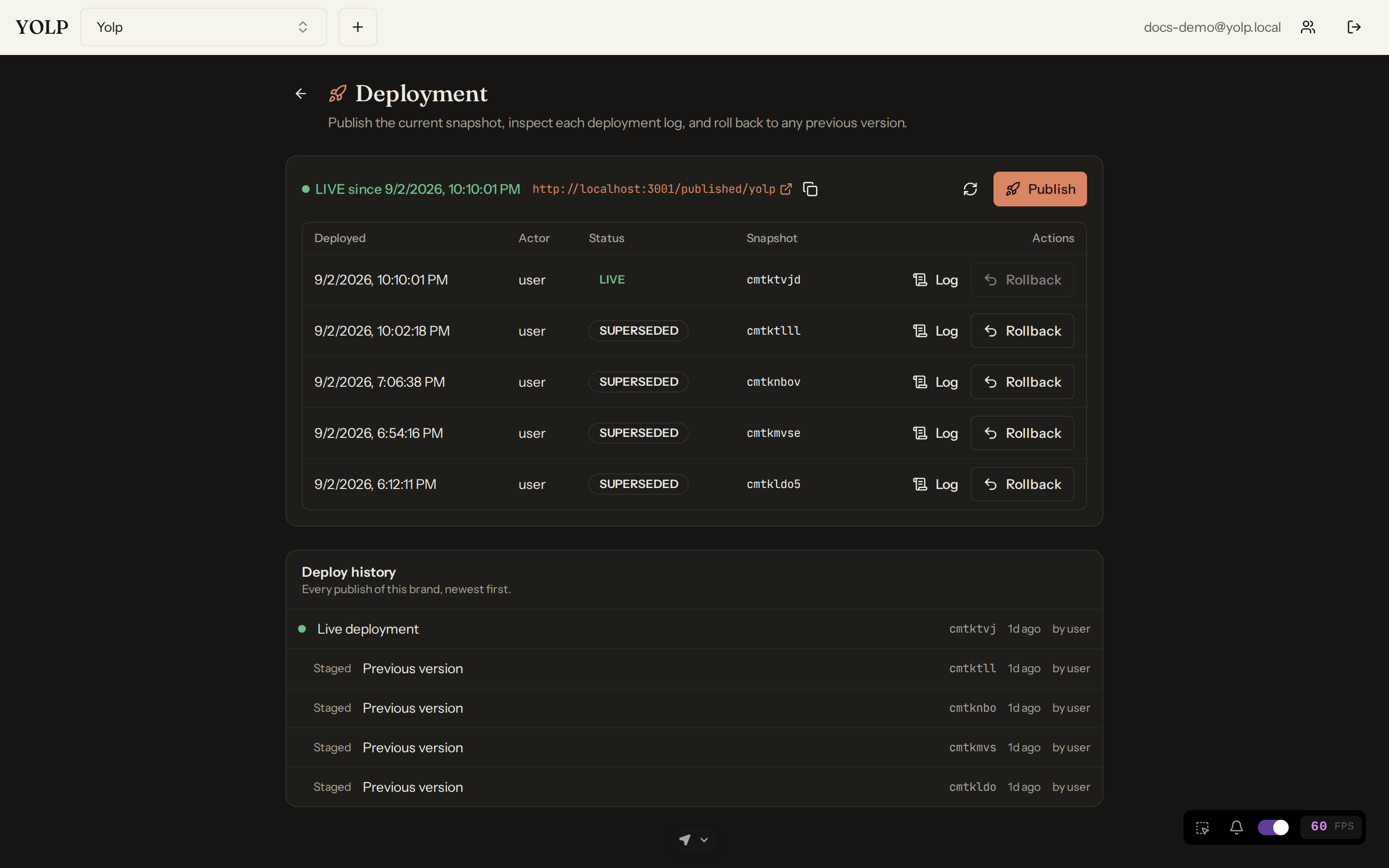
Publishing a build
Publishing takes the current state of your brand's replica and produces a production build. Before the build starts, published CMS entries are re-projected into the site so the shipped HTML always matches the database, and pending AI media jobs are awaited so no page ships with placeholder imagery.
Publish status
Every publish is a tracked operation with visible status: you can see the build progress, whether it succeeded, and which snapshot is currently live. The publish result includes what was deployed and when.
One-click rollback
If a deployment misbehaves, rollback redeploys the previously stored snapshot in one click. Rollback reuses the stored bytes — it does not rebuild — so recovery takes seconds and cannot introduce new build errors. Note the flip side: a very old snapshot predating analytics will warn that it cannot report data after rollback.
Hardened analytics injection
At publish time, AURAFUSE injects or rewrites the analytics tracker in every HTML page of the snapshot, pointing it at the public ingest endpoint instead of your development URL. Publish then verifies the result and refuses to deploy a snapshot whose entry page lacks the tracker or still points at localhost — so a live site never silently loses analytics. Preview builds keep the development endpoint, keeping local beacons out of production data.
The live preview lifecycle
Alongside production, every brand has a live preview: a continuously refreshed view of the working replica. The lifecycle looks like this:
- Edit in the Editor Studio — the preview updates as you work.
- Publish — the current state is frozen into a production snapshot.
- Keep editing — the preview moves on while the published site stays stable.
This lets you iterate fearlessly: the preview is your scratchpad, the published site is your contract with the world.
After publish: the intelligence scan
A successful LIVE publish triggers an intelligence scan of the brand automatically. The scan feeds the AI CMO with your site's freshest state so its recommendations stay current — it runs in the background after deployment and never delays or blocks the publish itself.
Tips
- Publish after big CMS edits so re-projection runs against final content.
- Check publish status before announcing a launch — the tracker verification is your guarantee analytics will report.
- Rollback first, diagnose second: restoring the last good snapshot is instant.